Infrastructure
Components
The infrastructure for Lintol has a number of different components. Each of these components are hosted within a linux server environment. There are a numerous ways of hosting the linux environments required for Lintol. This documentation records and explains the infrastructure used by the Lintol development team.
- AWS EC2 - compute resources
- AWS Route 53 - DNS management
- AWS S3 - data storage
- Kubernetes - container cluster
- Traefik - routing and load balancing
Deployment Tools
Deploying the Lintol infrastructure on the components referenced in the Components section requires a number of deployment and configuration tools.
- AWS CLI
- KubeCtl
- Kops
- Helm - prerequisites [Composer, Docker]
Application
Components
Lintol has a series of components that have been created using various technologies and programming languages. Distributed components connect via a central component named ‘Capstone’. Here is a list of the components, the general function they provide and the technology or programming language used to create them.
- Lintol-frontend - Front-end UI - Javascript, Vue
- Crossbar.io - Publish/Subscription and messaging queue
- Doorstep - Data processing job management - python
- Capstone - Coordinator API - PHP, Laravel
Diagram
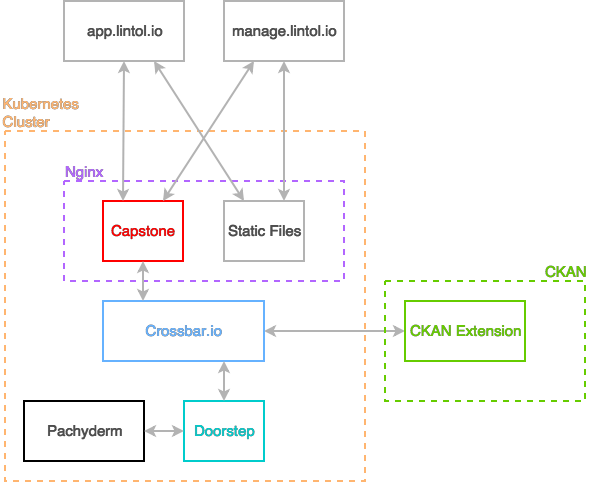
Front-end
The Lintol front-end UI is the web interface component for Lintol. It provides a web portal for using Lintol’s other components. It is Javascript based project that uses Vue templates to render a single page application connected to the Lintol Capstone backend.
Front-end Deployment
Doorstep requires npm (node packet manager) to install the project dependencies. Here are the steps to run the front-end UI as a standalone process for development, production and testing.
# install dependencies
npm install

# serve with hot reload at localhost:8080
npm run dev

#build for production with minification
npm run build

# build for production and view the bundle analyzer report
npm run build --report

# run unit tests
npm run unit

# run e2e tests
npm run e2e

# run all tests
npm test
Doorstep
Doorstep is a CLI component of Lintol that runs the validation processors against the data provided. It can be operated via the command line as a standalone process or be integrated with the Lintol UI and Capstone components to provide a fully featured web application.
Doorstep creates data validation jobs by combining a data source with a validation script in a virtual environment that can be run in a single or multi threaded process. Standalone Doorstep will receive parameters for the script and data source and run a job in single threaded process.
Doorstep requires Python 3.4 or higher, geos package and virtualenv which can be installed using pip3. Here are the steps to run Doorstep as a standalone process from the command line.
Doorstep Deployment
OSX prerequisites
brew install python3
brew install geos
pip3 install virtualenv
Linux prerequisites
sudo apt-get install python3 python3-dev python3-venv libgeos libgeos-dev python3-pip
Get and run Doorstep
```shell git clone https://github.com/lintol/doorstep cd doorstep pip3 install -U setuptools python3 -m venv env . env/bin/activate python3 setup.py develop ltldoorstep process –engine dask.threaded example/data/protected_wrecks.geojson example/processors/boundary_checker_impr.py